
Articles
| Name | Author | |
|---|---|---|
| CASE STUDY: Launching an electronic logbook at easyJet | Philip Hyde, Implementation Project Manager, easyJet | View article |
| CASE STUDY: A change for the better at World2Fly | Alvaro Coromina Sanz, IT and Innovation Director, World2Fly | View article |
| CASE STUDY: Digitalizing Scheduled Maintenance: WestJet’s Production Control success story | James Homeniuk, Manager eMRO Platform, WestJet | View article |
| CASE STUDY: from data silos to insight | Andres Kjerulf, Director of Airworthiness, Texel Air | View article |
| CASE STUDY: From prediction to action at KLM Cityhopper | Robin Duteweerd, Fleet Manager, KLM Cityhopper | View article |
CASE STUDY: Launching an electronic logbook at easyJet
Author: Philip Hyde, Implementation Project Manager, easyJet
Subscribe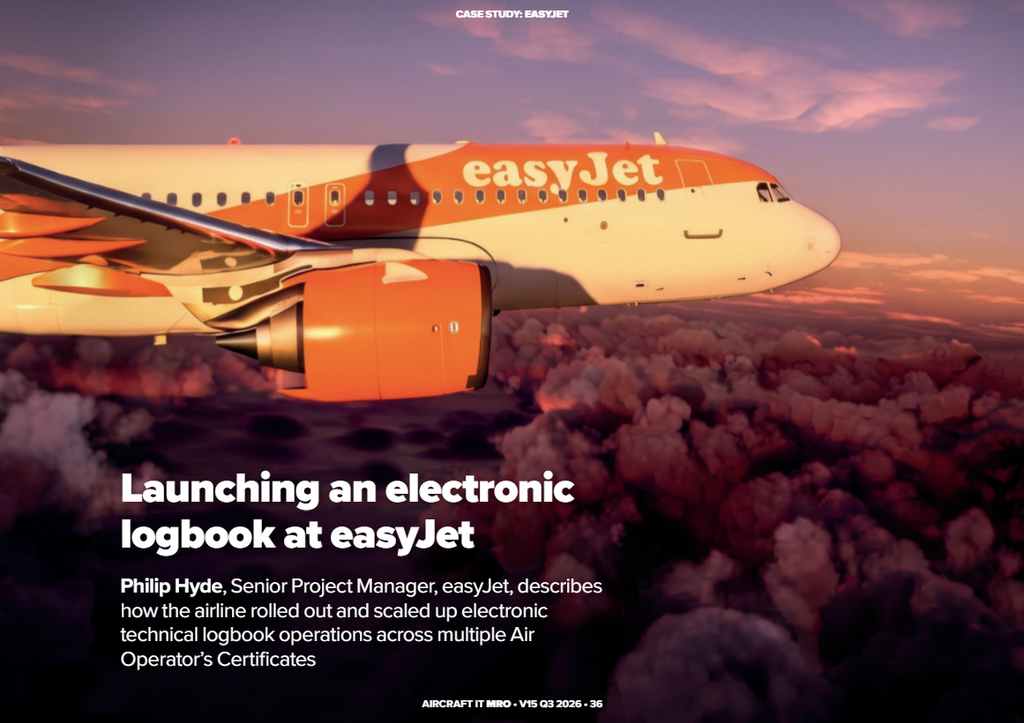
Philip Hyde, Implementation Project Manager, easyJet, describes how the airline rolled out and scaled up electronic technical logbook operations across multiple Airline Operations Centers
This case study focuses on easyJet’s implementation of Ultramain’s eTechLog, looking at why and how we rolled it out. The first point to bear in mind is that this was one of the biggest changes we have ever made to our operation in the airline’s 30-year history. We had to roll out the project with minimal disruption to our operations, which meant there was only a narrow window of opportunity to achieve this.
ABOUT EASYJET
For context, we are a low-cost short-haul European airline with an inter-European short-haul fleet. We have some complexity in that we operate three AOCs (Airline Operations Certificates): one in the UK; one in Austria for the European fleet; and one in Switzerland (figure 1). We regularly transfer aircraft between AOCs, so the solution had to support registration changes whilst maintaining AML (Aircraft Maintenance Licence) continuity.
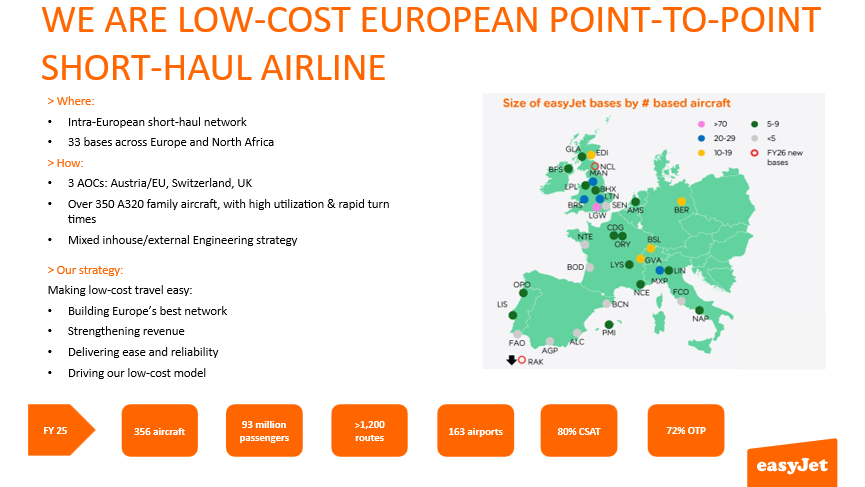
Figure 1
Our biggest set of bases is in the UK, and we have recently opened a fourth AOC in North Africa, in Marrakech, which further adds to the complexity. We operate a fleet of over 350 Airbus A320 family aircraft and fly 93 million passengers per year. With maintenance, we operate a mixed model for engineering providers, with some in-house for line maintenance and base maintenance, and some external.
Our strategy of making low-cost travel easy is being achieved by building Europe’s best network, and that’s why we are slightly different to most low-cost operators in Europe in that we fly mainly from primary airports. So, for example, Charles de Gaulle or Orly in Paris, Milan Linate, and various others across our network of destinations. We are also focusing on strengthening revenue with a big push on increasing our holiday flights through easyJet holiday packages.
Improving reliability
We now have more flying throughout the year, and our lower flying seasons have reduced, which means we had smaller windows in which to go live with the eTechLog, to avoid peak times. The electronic technical logbook is about making it easier for both our colleagues and our customers by boosting reliability through improvements to on-time performance.
MEETING MULTIPLE REQUIREMENTS
The eTechLog also provides an additional safety barrier to prevent aircraft departing in an unairworthy condition (figure 2). It gives us a single point of truth on the flight deck and across the network, even when there isn’t connectivity, which is quite rare, everyone knows what’s going on with the aircraft.
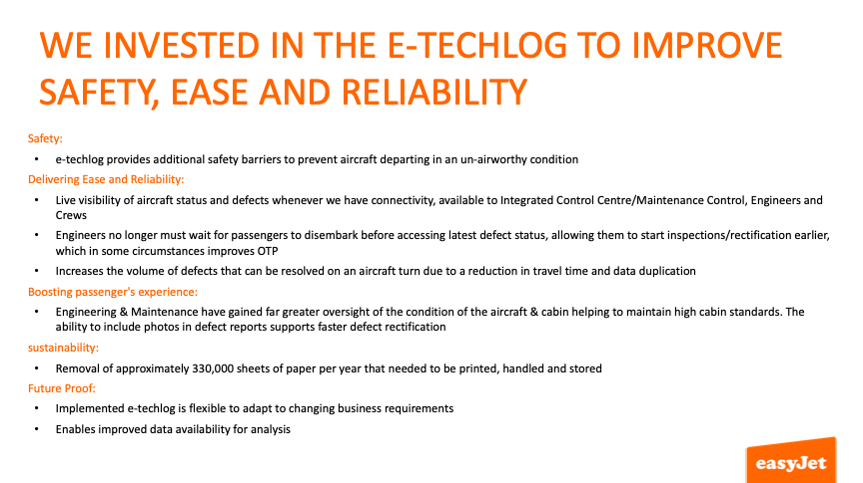
Figure 2
Ease and reliability across the network are boosted with the eTechLog as data and images appear immediately on the Ultramain MOC Fleet Dashboard and in our AMOS (Aircraft Maintenance and Operations System) through a two-way integration, so everyone can see what’s going on. Images are useful, for example, to help an engineer work out exactly what the problem is that has been highlighted, without having to wait for passengers to disembark before seeing it for themselves. This improves accuracy, saves time on turnarounds, and improves the customer experience. With our tight turnaround times, the advanced view provided by the eCabin Log is the difference between addressing a cabin report or deferring it.
As it is for everyone in the airline industry, sustainability is a priority for easyJet. Our goal is to remove paper entirely from our fleet, which adds up to 300,000 sheets of paper across the fleet. Future-proofing our process is another important consideration. For example, two live projects are currently using the eTechLog as a bedrock and integrating it with other systems to make life easier for pilots, crews and engineers. There’s a wealth of data that we can access with the eTechLog to gain important operational insights.
ETECHLOG BENEFITS
For pilots, repetitive data entry is replaced by e-forms that are triggered by certain words, which is particularly useful in the smoke and smell events form. (see figure 3).
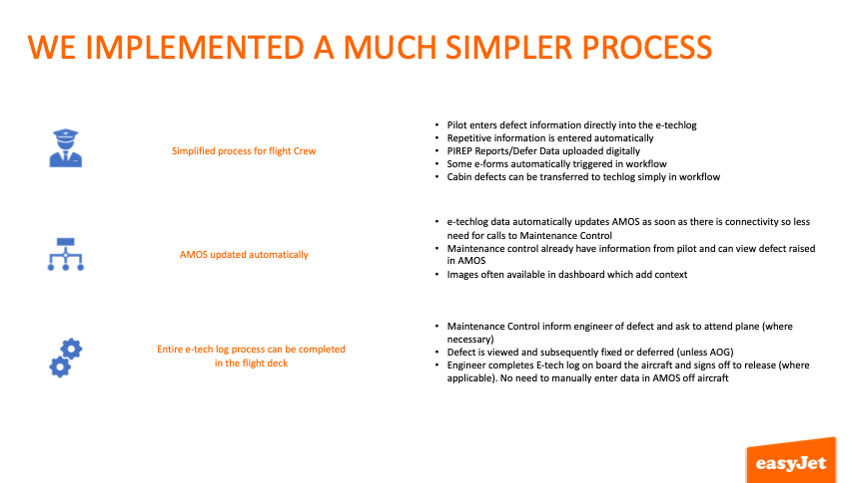
Figure 3
Cabin defects are managed more easily as well. The cabin crew’s iPads are connected to the eTechLog on board the aircraft, which they use to make notes and take photos that are sent to the pilot, who decides whether or not it is an airworthiness defect and enters the details in the eTechLog or the cabin log. Likewise, our maintenance control team in the AOC see live information and can make better-informed decisions that would previously have required multiple phone calls or driving back and forth between the office and the aircraft. Reducing travel time is a significant efficiency improvement for our engineers and mechanics.
TIGHT IMPLEMENTATION TIMELINE
Having three AOCs added to the complexity of integrating the eTechLog, but it also had benefits (figure 4) as we learnt from each individual AOC implementation. We have a one-way direct integration with flydocs, which is the repository for the ‘Golden Copy’, and an inward integration with TOPS (Total OPerations System), which is our operational database. The result is automated Tech Records update and automated flight sector information prior to departure.
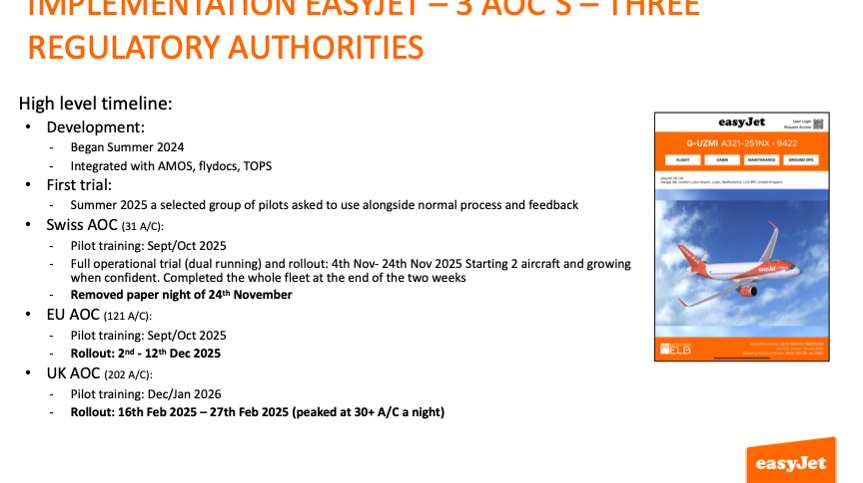
Figure 4
As with any implementation, there was a risk of going too fast, but also of going too slowly, when pilots and engineers might not be sure whether an aircraft is paper or electronic. Go too fast, and you are potentially adding extra burden onto the maintenance control team. However, we decided to go faster rather than slower and provide additional support for pilots throughout the implementation period. This involved a volunteer group of pilots who answered colleagues’ queries about the new system. We also produced a user guide containing step-by-step help, as well as a QR code to access support and information.
PROJECT SCOPE
In terms of how we implemented the new technical logbook, we started off with a really clear scope and set of requirements (figure 5).
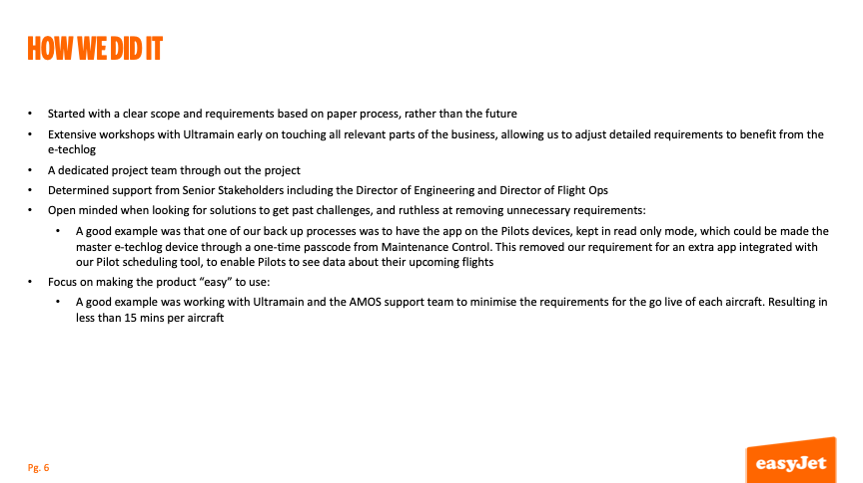
Figure 5
As soon as we’d completed the procurement exercise, we ran extensive workshops with Ultramain, where we engaged with front-end colleagues, who included ground crew, engineers, pilots and cabin crew, along with people working slightly further back in the process, as well as those who support our systems. This comprehensive approach ensured we could adapt processes to make sure that they were right for what we needed from the eTechLog.
Dedicated project team
We benefited from having a dedicated project team throughout the transition, who were passionate about it and had the necessary knowledge. They created our user guide and training material. We also received strong backing from our senior stakeholders. Another important factor in the successful implementation was being open-minded. We got rid of things we didn’t need and added items that we did. This flexible approach continued after the project went live, and we expect it to continue as we gain experience and identify further opportunities
Making the electronic logbook easy to use included creating a flight crew briefing app, which connects to our crew rostering system and operation system, so pilots can log in and see all the information about their next flight. Ultramain also worked with our AMOS support team to minimize the requirements for the go-live of each aircraft. Color coding adds to the ease of use, if an item is red, you know the aircraft cannot depart until the issue is resolved.
EASY TO USE
These screenshots (figure 6) of the product show the homepage, the cabin crew app and QR code.
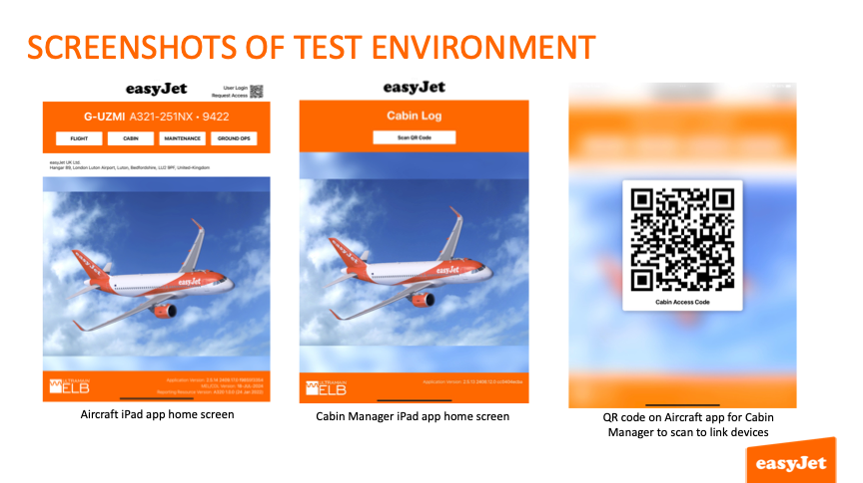
Figure 6
ELB includes an integrated app for cabin crews, so they can walk through the cabin and report defects without having to come back to the flight deck.
Dashboard views
Next, we can look at the dashboard, cabin LOPA (LayOut of Passenger Accommodations) and the galley area (figure 7).
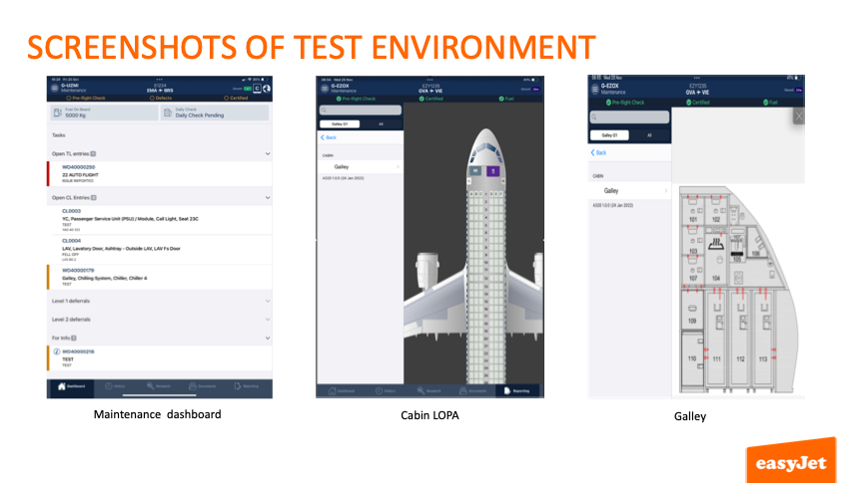
Figure 7
The integrated cabin LOPA is especially useful for both cabin crews and pilots. It pinpoints locations accurately and is aircraft specific. We can click on specific seats, as well as cover the galley and the toilet area. This provides the cabin crew with ease of accurate reporting. The ELB automatically adds the ATA codes.
Clearer messaging
Overall, the eTechLog provides us with many useful features (figure 8) that simplify how we work.
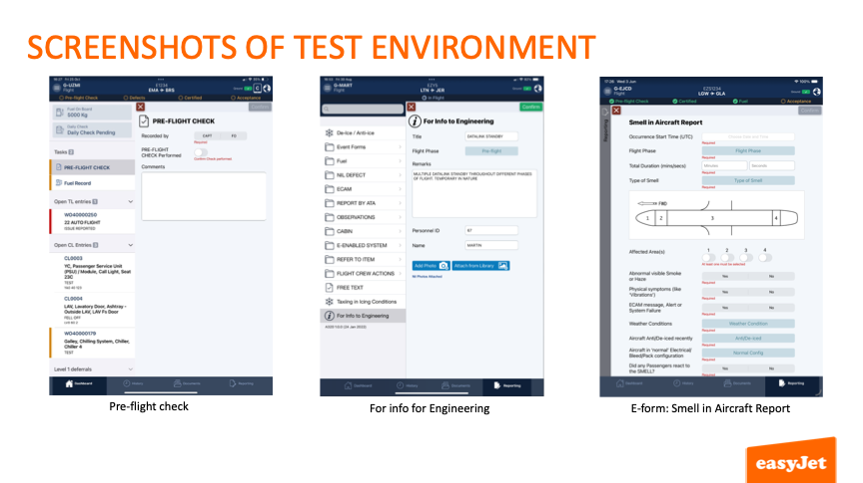
Figure 8
These include the pre-flight check, which we are currently adding to, along with information for the engineering team. We also have a decision support tool for engineers to look at specific data about an individual aircraft and identify any trends, while an e-form is a useful tool for reporting a variety of events, including airborne vibration and cabin smells.
LIVE IN ACTION
In figure 9, you can see the live system for our maintenance control team, showing the AOG (Aircraft On Ground), repeat inspections and open defects.
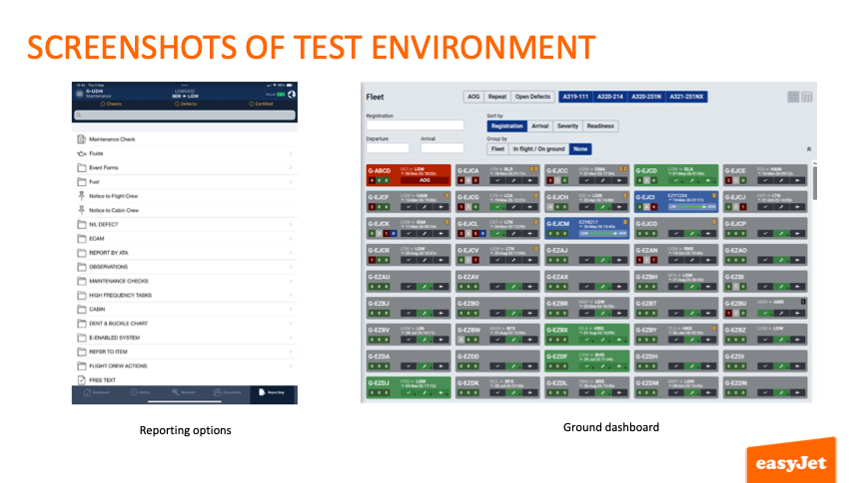
Figure 9
The team can see from the color coding exactly where they need to prioritize. Although they already have this information in other systems, like AMOS, putting it all together in an easy-to-see format provides a real time status of the whole fleet.
BACK-UP FOR PILOTS
Finally, I’d like to show you our back-up system when there is a lack of connectivity (figure 10).
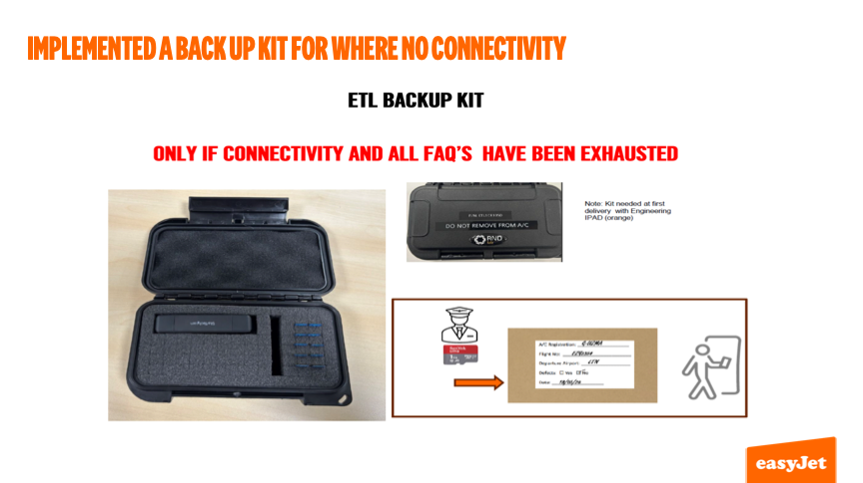
Figure 10
In these situations, we use an SD (Secure Digital) card, as airline regulations require us to keep a ground copy. We would keep SD cards for 72 hours, then destroy them if they are no longer needed. As soon as ELB connects to ELB Ground, the SD card is redundant. Our experience is that the SD is rarely used.
Comments (0)
There are currently no comments about this article.
To post a comment, please login or subscribe.