
Articles
| Name | Author | |
|---|---|---|
| CASE STUDY: From startup to multi-station airline: BeOnd digitizes and scales up flight operations | Zain Eejaz, Manager, Flight Operations Technical & Planning, BeOnd | View article |
| CASE STUDY: Saving fuel in the climb at KLM Cityhopper | Torsten van Kouwen, Business consultant ATM and & Matthies Dubelaar, Business Pilot Digitizing; both at KLM Cityhopper, Flight Operations | View article |
| CASE STUDY: Wizz Air achieves greater fuel efficiency, during descent | Captain Petros Souppouris, Safety Captain and Fuel Efficiency Promoter, Wizz Air, and David Bronks, Key Account Manager, AVTECH | View article |
| CASE STUDY: Peach Aviation optimizes airport and obstacle data management | Yuya Maeda, Performance Engineer, Peach Aviation | View article |
| CASE STUDY: Marabu Airlines improves EFB-to-Operations and Crew Management data handling | Maxim Dubovik, EFB Administrator & Manager, Marabu Airlines | View article |
| CASE STUDY: The perfect balance with documents at Sunclass Airlines | Anders Hofmeister, Captain and Manual Administrator, Sunclass Airlines | View article |
| CASE STUDY: A rapid digital evolution at Discover Airlines | Alexandra Kosjuberda, Manager Crew Training, Discover Airlines | Sarah Kurowsky, Manager Flight Ops Engineering Support, Discover Airlines | Arne-Martin Gruene, Project Manager, Lufthansa Industry Solutions | View article |
CASE STUDY: The perfect balance with documents at Sunclass Airlines
Author: Anders Hofmeister, Captain and Manual Administrator, Sunclass Airlines
Subscribe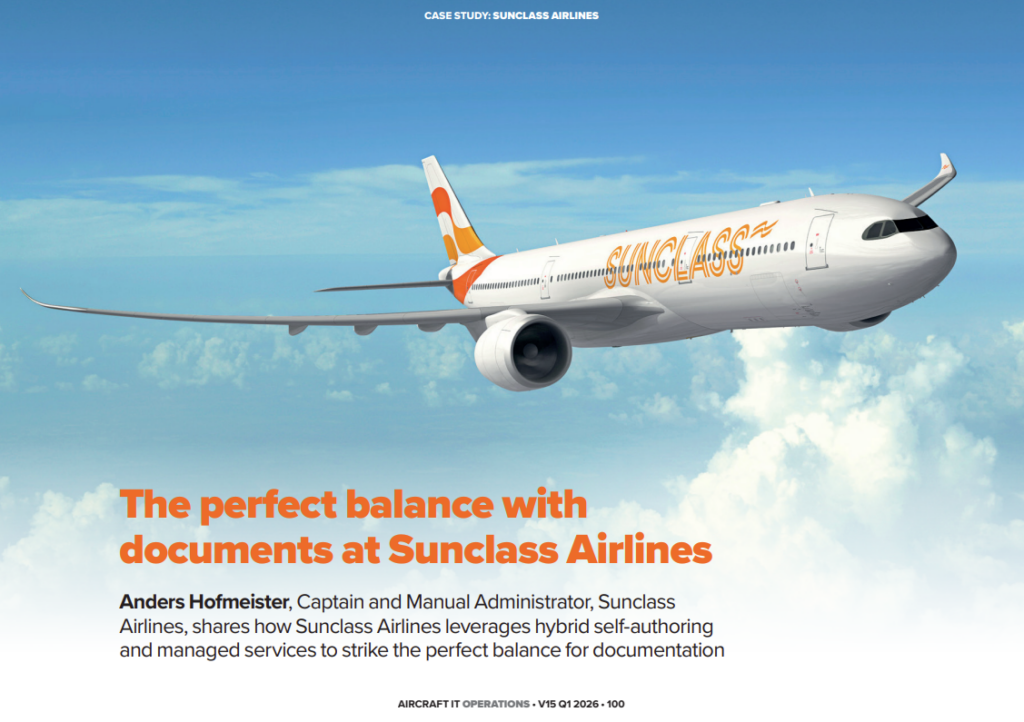
Anders Hofmeister, Captain and Manual Administrator, Sunclass Airlines shares how Sunclass Airlines leverages hybrid self-authoring and managed services to strike the perfect balance for documentation
Before launching into the topic of this article, I’ll introduce myself and the airline. Now a pilot with Sunclass Airlines, I started in the Air Force, I’ve flown a lot of different airplanes including now, as a Captain on the Airbus A321 and A330. At the same time, in the office, I’m the manual administrator. However, what I’m not, is an IT specialist. As users, Pilots know something about the technology, but still, it’s really nice to sometimes have a support line to ‘call a friend’, and that’s where our document management system, through Comply365 comes in.
SUNCLASS AIRLINES
A little about Sunclass Airlines, whose origins go back to the 1960s in Scandinavia. The name was changed to Kron Air, a charter airline, and then, in 1994, to Premiair. In 2002, the airline was renamed as My Travel before becoming Thomas Cook Airlines, Scandinavia, in 2008 and, since the 2019 demise of Thomas Cook, we are now Sunclass Airlines a Nordic airline. Our more than 900 staff are based mainly in the Nordic Countries with some in Spain and the UK As shown in figure 1.
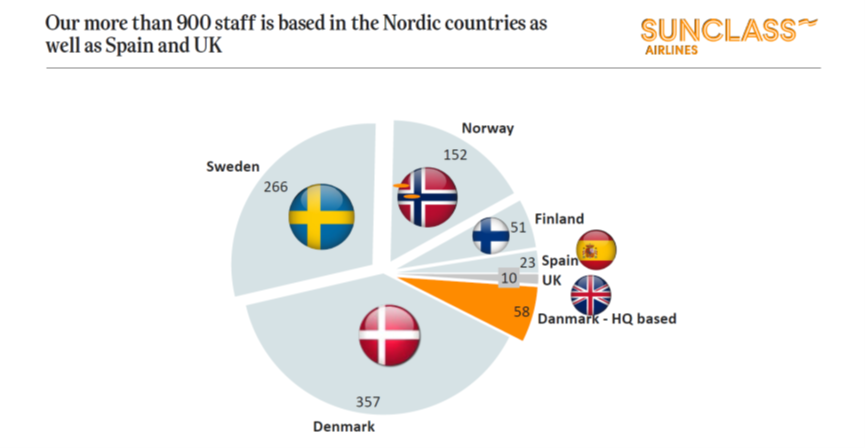
Figure 1
We’re a fun airline and we try to keep it that way with an open, honest and relaxed culture, both in the airline but also with the vendors that we work with. At the same time, we strive to think ahead, be innovative and always looking for new possibilities to evolve and enhance our operation.
We fly out of the Nordic bases, as on the map in figure 2.
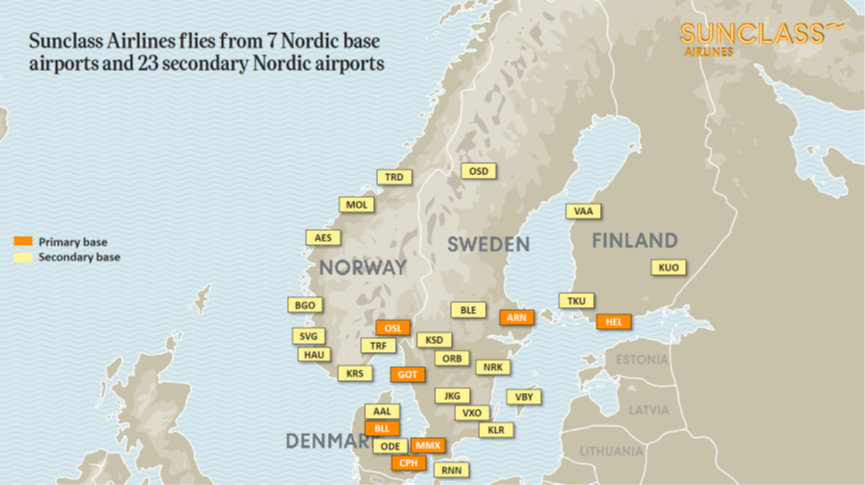
Figure 2
Our bases are from way up in Helsinki down to our Copenhagen headquarters and we mainly serve holiday destinations as shown in figure 3.
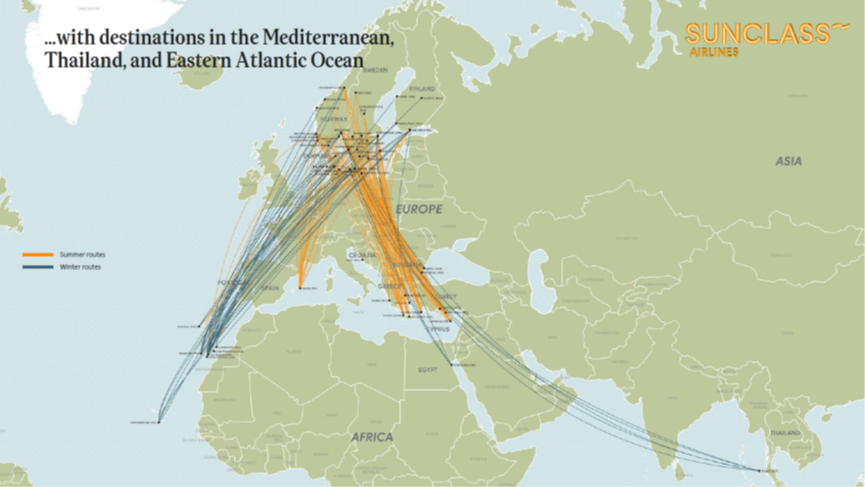
Figure 3
During the European summer, we mainly fly short haul to the Mediterranean, the Canary Islands, Palma and Cyprus. In the European winter, we fly long haul to Thailand, Phuket, and the Caribbean.
We’re a fairly small airline with twelve aircraft in the fleet, three Airbus A330s and nine A321s, a mixed fleet which you can see in figure 4.
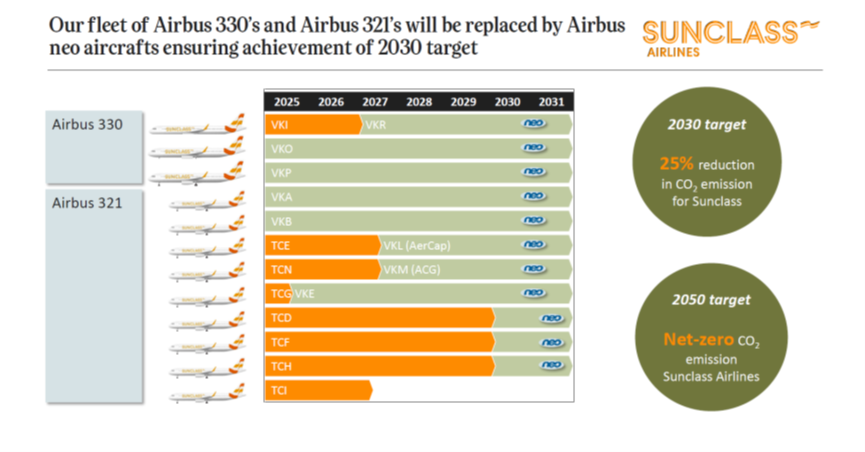
Figure 4
We mix our fleet use, perhaps flying to the Canary Islands with an A321 and flying back with an A330; Also, the fleet is mixed between A330 and A321 but also between legacy, neo, and new generation neo aircraft. At the time of writing, we had five different models in the fleet, which makes the document management system really important for us, even though we’re smaller than a lot of other airlines. The paperless cockpit is really important for us, and it doesn’t stop in the cockpit. We’re trying to expand this paperless environment into the office, where we’re doing training across all the different departments.
MANAGING DOCUMENTATION
To achieve this, we use Comply365 documents both on PCs, for those in the office who are doing all the edits, and, for the end users, the iPad, for pilots and cabin crew. There are very few paper documents left on the aircraft.
In the context of this article, we’ve implemented a new system because we had some challenges balancing complexity and speed. We were facing a lot of new tasks and implementations in our manuals. At the same time, there was a high and growing volume of work to do. We realized that we needed a different structure for all of our manuals and we just didn’t have the manpower or the tools for the operational and regulatory demands. For instance, after audits we had difficulty managing all the documentation that was needed to complete findings in time. Finally, with compliance deadlines, we were using a lot of time getting into the EASA regulations and changes, and trying to find out in the manuals, where they impacted on our processes.
These are some of the challenges that we were facing before we got the new system. So how did we approach this? ‘Hybrid approach’ is a fancy term for using two types of approaches at the same time. The new thing we were implementing was self-authoring, returning control to the editor. It enables the editor and the subject matter expert to go directly into their manual and customize it while maintaining the same structure as the other manuals. Now we have a structure from Comply365, and a layout that we can use, enabling us to focus on the content instead. For operational purposes, the turnaround times really got shortened, which gave us back a lot of control. It was all quite new at the time of writing; we had been working with the program for a couple of months, so we’re still getting used to it, still building up experience.
The other part of the hybrid approach and which we have had for more than ten years is the managed service, the IT division and our safety net when things become too complex. That is the case with, among other things, the Airbus documentation with which some readers might be familiar; it’s quite complex documents. They use XML, in which Comply365 is really good, and there are a lot of data experts in Comply365 who we can use for all the Airbus documentation and any advanced tasks that we can’t figure out how to do. There is a team of more than 60 people working around the clock, because they’re situated around the world to deliver a pretty much 24/7 service. We also have a digital management team and, apart from this, there’s also the support team.
IMPLEMENTATION
We’ve been working with Comply365 or Vistair, as it was previously called, for more than ten years, using the Authoring Hub, Publishing Hub, Usernet, Interact and Forms, and we now started using the Self-Authoring tool. The transition wasn’t that difficult. We knew the layout, we knew where to look, but, of course, we needed to learn the actual tool. So, we had a visit from one of their experts from India, and he was there in house for a week for a training course, and then we started working with our manuals. While we were doing all this, Comply365 did all the manuals, all the bigger manuals, like the OM-A Operating Manual – part A: General / Basic), OM-D (Operating Manual – part D: Training), ATO (Approved Training Organization), MOE (Maintenance Organization Exposition) family and so on that were already in the managed service program, so they did the whole conversion on all those manuals. We are now looking into all the other documentation to streamline and structure in the same way so that all of our manuals will be completely streamlined.
At the time of writing, the split in the documentation, going through the managed and self-authored channels was about 60-40 because the managed manuals are still the greatest part and the biggest manuals. But it’s slowly heading towards 50-50, and, in time, we will go the other way because we’re starting to even author the managed manuals, the bigger manuals with self-authoring.
Eliminating Word files
The implementation strategy has been fairly easy and many of our expectations have been met. One of the main issues that we wanted to address was eliminating Word files, because we were just so tired of working in Word. Imagine editing an 800-page OM-A in Word, it’s really a hassle. And when the Table of Contents shifts, you have to keep going back and forth. With XML, there are so many more possibilities, so we were glad to have a means to eliminate Word from our records as in figure 5.1.
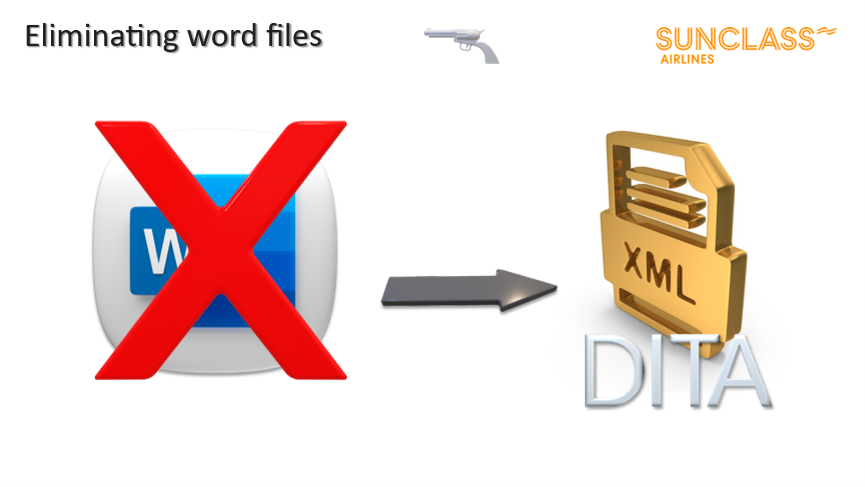
Figure 5.1
There is also the structured layout and style guide for XML but, at the same time, this tool is really easy to use. The layout for the editor is similar to Word with the same kind of tools, but it’s structured and it’s locked in a way that means that you can’t mess it up. We did have a lot of Word documents and we’re not IT experts, but Comply365 has the Word conversion tool, so we just put a word document into the machine, and out came an XML document, more or less. About 70 to 90 percent was converted, and then we had to tweak the last bit. Figure 5.2 shows a comparison between XML and Word and what we have gained.
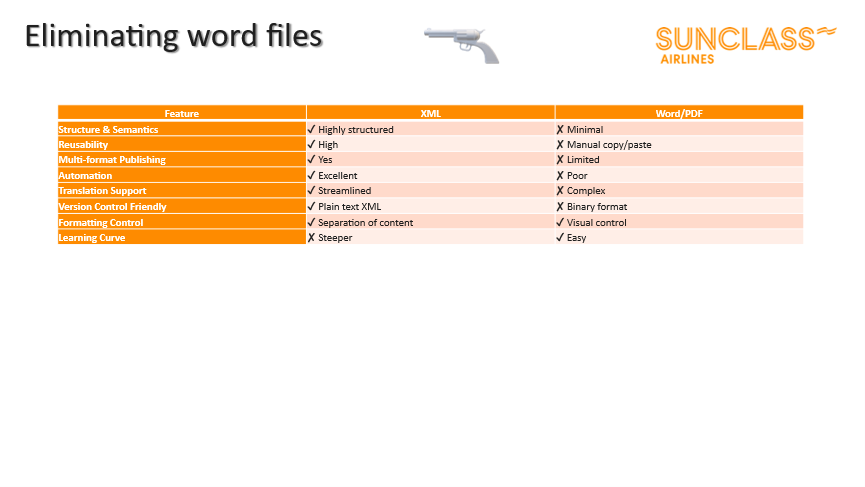
Figure 5.2
We’re getting there, and a lot of our other manuals have now been converted, and, further on, I’ll give you some examples of how it looks.
EXPECTED BENEFITS AND EFFICIENCY GAINS.
There were a number of benefits that we expected to gain from the new solution as in figure 6.1.
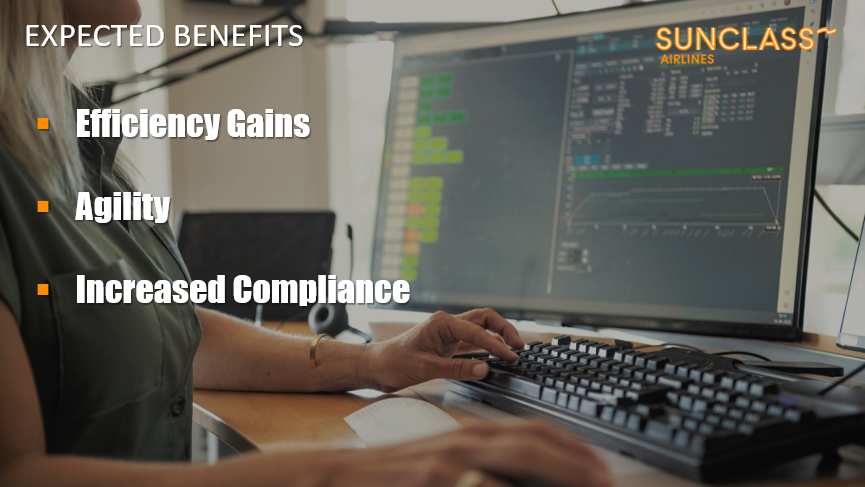
Figure 6.1
We needed faster turnaround times and to be able to be more efficient towards findings and compliance as well as operational changes. We also needed agility in order to be flexible and agile in the way that we work with all of our manuals. And this is for the whole company with technical manuals, Flight Ops, Ground Ops, the whole airline. We have, great expectations for increased compliance because we’re tagging all our manuals with regulatory tags, so that it makes it much easier for the editor and the subject matter experts to find the actual reference in the manual to refer to, for example, the EASA regulations. This will be enhanced for compliance purposes with an automatic monitoring tool for this part doe which we need to tag all the references; then it’s going to be monitored, and we’ll get information when any regulation is updated. There will be a notification that you have to look at this reference, because this might be linked to an update in the EASA regulations. In figure 6.2 is how it looks.
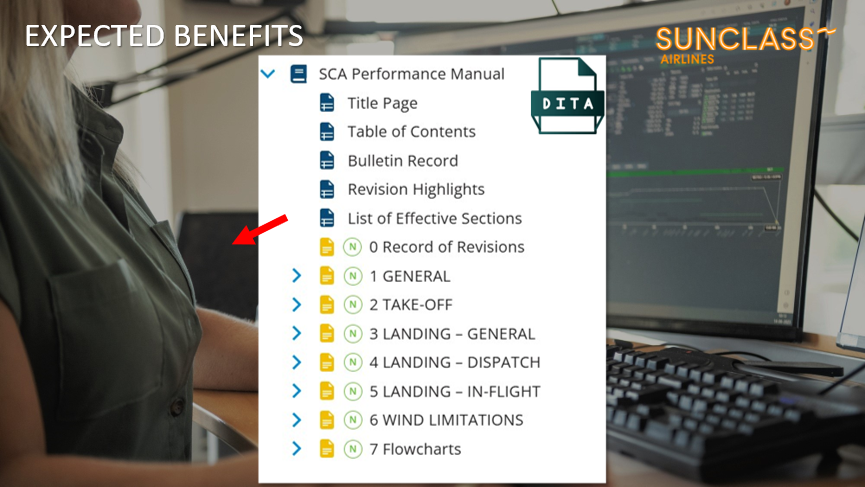
Figure 6.2
This is the DITA (Darwin Information Typing Architecture) format, very streamlined, and this is the actual layout of the manual. And as you see, the compliance tag is put in with the red arrow. Figures 6.3 and 6.4 show how the compliance indicator works.
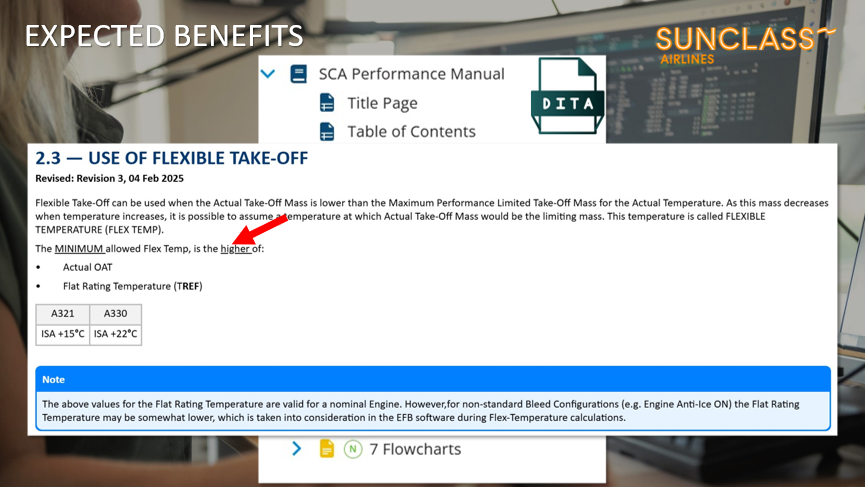
Figure 6.3
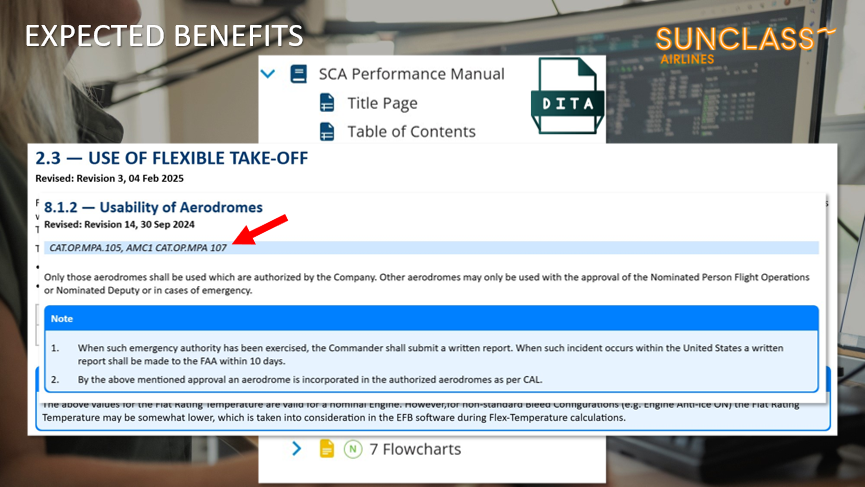
Figure 6.4
What we got is summarized in figure 7.

Figure 7
At the time of writing, we had already saved a lot of time, even though we’d been using this new tool for only a couple of months. Turnaround times have also enjoyed great improvements as well as compliance with the CAA. The waiting time for them has greatly decreased. There is also improved document structure and standardization: we went from Word documents converted into PDF and then published to a structured and standard layout document across the business. And then, of course, it’s user friendly; for the end user, it’s visually appealing and, especially for the editor and the subject matter expert, it’s really easy to use, and doesn’t take a lot of time to get used to editing manuals now, compared to what went before. There is also greater empowerment for subject matter experts. These are people who are not used to editing manuals because we’ve had a larger editing team before who were doing all the edits, and we were sending these edit packages to Comply365 and then getting them back from Comply365 again. This really gives us the control back for all our manuals, not just the larger ones.
We are a small three-man publishing team, and that’s all we need, because the rest is pretty much taken care of with the hybrid solution. We’re using the Manage team for things that we just don’t have the capability to do all the time, and the rest is done in-house with the self-authoring tool. Also, because we we’ve been working with ContentManager365 (previously known as DocuNet) for more than ten years, we knew how it worked, how it looked and, with the ease of use of the self-authoring tool, it was pretty easy to start working with it. We had one week of on-site training, and had some support after that, because questions always arise, but, by the time that we’d been working with it for a couple of months, it all became more or less in-house support now.
SUCCESS STORIES
In figure 8.1 you can see our team of three, as mentioned above with a nice avatar of their intern and fourth team member, the Comply365 solution.
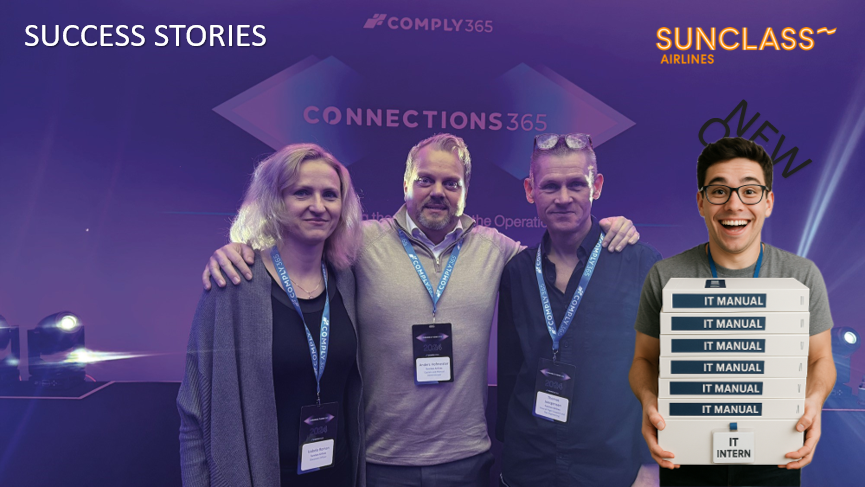
Figure 8.1
Figure 8.2 shows how the old manual looked
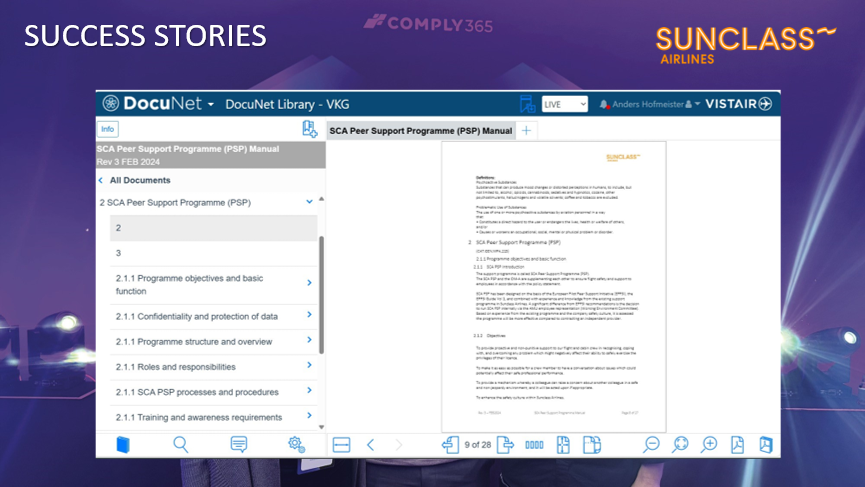
Figure 8.2
It was unstructured and difficult to navigate as well as difficult to maintain. In figure 8.3 is the new, better organized and more manageable DITA XML format.
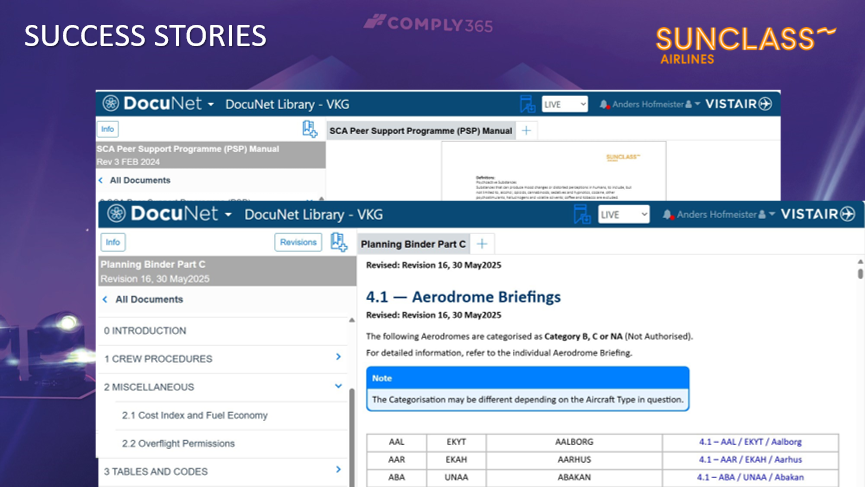
Figure 8.3
This is a structured system: you can see that the table of contents is structured. All links are controlled, and the layout is really nice and approachable. We’re happy, our IT and intern is really happy that all the manuals are being streamlined, which makes for, all in all, a positive outcome.
FUTURE OUTLOOK
Looking to the future, figure 9 shows a few of our ideas going forward.
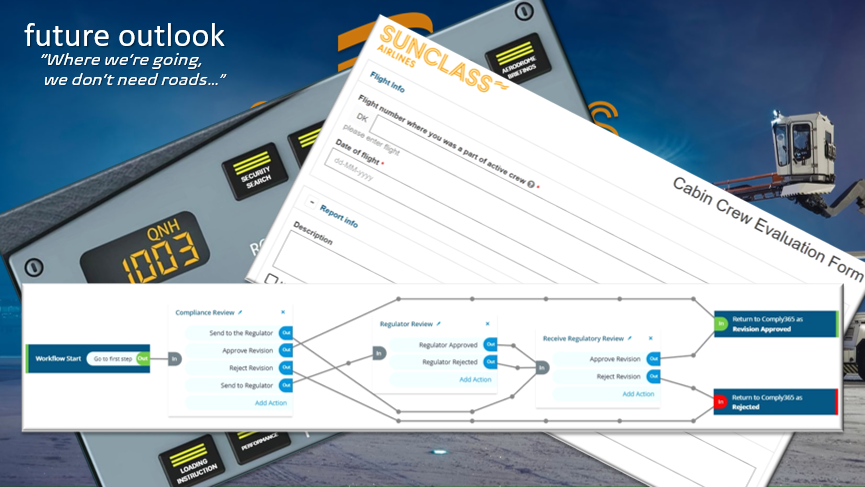
Figure 9
Where we’re going, we don’t need roads, and that’s literally, because we’re flying. We’re looking into workflows and flash pages, you can do these in documents as well, and we’re looking into doing these kinds of workflows for specific situations, both for pilots and cabin crew and even in the office. In this example, we’ve done a winter wonder workflow that is dedicated to winter operation. All you need to do is push a button and it takes you directly into the document that you need. You can configure the layout in whatever way you want. We did another one where we changed the buttons. You can have a certain layout and a certain workflow for people to work with. Those are some of the things that we are working on, and it’s part of ContentManager365 as well.
Another thing that’s part of ContentManager365 is Forms, as I mentioned before, and Forms is another way of becoming paperless. We still have a few forms in the technical department that we are trying to convert to digital format. Forms can be configured in any way you want. And it’s quite easy for the editor to arrange these different forms and make them exactly how they are wanted. This is also part of ContentManager365.
Lastly, when we’re talking workflows, we’re also looking into the automation of workflows. We’re still not there yet, but it’s primarily because of the CAA in Denmark, who are still a little bit old school. But we hope that in the future, the whole process of compliance and getting the manuals approved will be almost completely automatic. So as soon as the editor is finished, during his edit, it goes on to the owner of the manual, who then usually approves the manual. It then goes directly to the CAA and they either approve it or reject it, following which, it goes back and forth in the workflow. But everything is automatic. So, the document is being sent automatically through this system. This is something that can be set up also in ContentManager365, giving the possibility to do all sorts of workflows. But of course, you have to have the different stakeholders involved and, as I mentioned above, the Danish CAA is not yet so keen; they still like PDFs.
This is what we’re doing at Sunclass Airlines; I hope that readers will find our experience interesting and informative to think about when they are contemplating making a similar upgrade to this in their own airline.
Comments (0)
There are currently no comments about this article.
To post a comment, please login or subscribe.