
Articles
| Name | Author | |
|---|---|---|
| CASE STUDY: AirAsia Indonesia accelerates uptime and cuts costs by digitizing AOG parts sourcing | Haryo Hadie Negoro, Manager, Material & Purchasing Control, AirAsia Indonesia | Ahmad Naim Abdullah, Manager, Digital Transformation – Operations, Asia Digital Engineering (ADE) | View article |
| CASE STUDY: Southwest Airlines realizes the Power of historic data and digital maintenance | Barry Lott, Director of Aircraft Records and Maintenance Reliability, Southwest Airlines | Cameron Byrd, Founder and CEO, AIXI | View article |
| CASE STUDY: Accelerating Aviation Transformation at XWing | Jeffrey Wehrenberg, CEO, XWing | Jim Buckalew, CEO, AeroATeam | View article |
| CASE STUDY: How interCaribbean ended its paper chase by switching to electronic technical logs | Hugo Mendez, Director of Safety and Quality Assurance, interCaribbean Airways | View article |
| CASE STUDY: Modernizing asset records at CommuteAir | Heather Hinton, Director of Maintenance Programs, CommuteAir | View article |
| CASE STUDY: SolitAir embraces digital-first maintenance and engineering from day one | Sandeep Kumar, Director – Engineering & Maintenance, SolitAir | View article |
CASE STUDY: Modernizing asset records at CommuteAir
Author: Heather Hinton, Director of Maintenance Programs, CommuteAir
Subscribe
Heather, Hinton, Director of Maintenance Programs, CommuteAir and Travis Kissane, GE Aerospace’s Software as a Service, share a success story in aircraft technical records, scanning efficiency and user adoption
While it’s not the most glamorous or eye-catching step in the complex processes of aircraft Maintenance, Repair and Overhaul (MRO) scanning is a critical component in any process that uses records and requires that they are kept and accessible. This case study looks at how a busy airline maintenance division worked with its technology collaborator to not only improve the scanning process itself but also to improve efficiency. First, Travis Kissane, Senior Product Director at GE Aerospace, Software as a Service.
Travis Kissane
When GE Aerospace looks at the whole digital record space, our main concern is, how to make the process, from ingestion points to outputs, as efficient as possible for our customers. There are specific touch points for our customers where we know we need to pay special attention, and one of those is scanning. It’s the necessary evil, especially on the digital roadmap, because whether you are fully digital, or still use stacks of paper, you will need some type of scanning process or function. As you can see in figure 1, we had a third-party scanning function that we used with our product; however, we realized about a year ago that we needed to get some feedback and input from our customers to ensure that they have a better scanning experience.
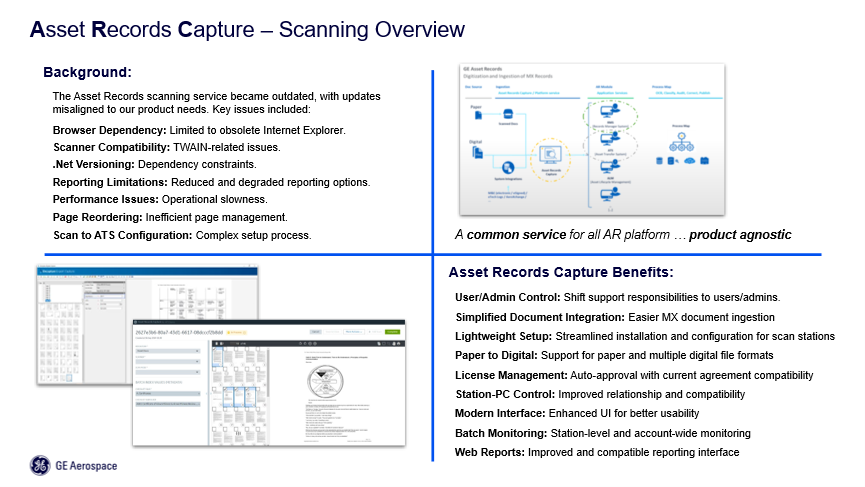
Figure 1
Scanning goes deep into organizations; the shop floor, parts receiving, records managers, they all do scanning. So, how could we make sure that they are successful in this process? We went through a development process and collaborated with early adopters including Heather at CommuteAir.
BRINGING SCANNING UP TO DATE
Heather Hinton
CommuteAir has been in operation for 35 years and I joined eight years ago. As I moved through CommuteAir, I took on maintenance programming, then, in 2023, aircraft records. Our collaboration with GE Aerospace started in 2020 but I don’t think we implemented well as a customer. Figure 2 shows the past present and future of this case.
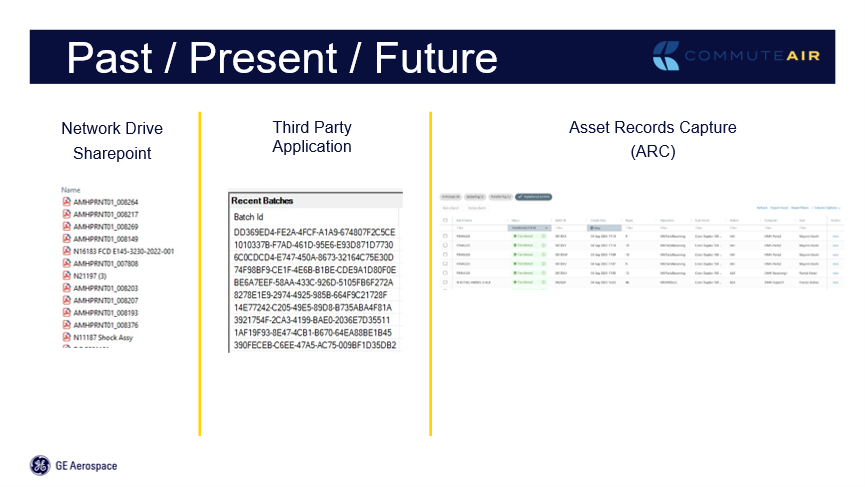
Figure 2
In 2023 we had GE Aerospace’s system but didn’t know what we were doing with it. We were going through all the steps but didn’t know what we were getting out of it; we wanted to know what we could do to get where we needed to be. The GE Aerospace team responded quickly, and we met to strategically map out a path to get there. GE Aerospace worked to resolve all issues that we raised and the challenges we had identified. For three years prior to 2023, we had been working with network drives and SharePoint drives at all locations where we were manually scanning, so that we could have access to records. The challenge with that was that, while anybody could scan to that network drive or to the SharePoint drive those scans were not searchable; there was no keyword search. Although it worked, it was hard to audit. We also ran into scanner jamming problems as the system grew; the more we were putting in, the more trouble there was, which made us wonder how, in the future, we would be able to answer regulatory questions about shredding paper. That’s when we started working with GE Aerospace. There have been challenges but CommuteAir has been fully utilizing GE Aerospace’s ARC (Asset Records Capture) since July 2025.We have stopped using the third-party application, just leaving them on a couple of computers, in case.
BENEFITS AND CAPABILITIES OF ARC
One of the best things about ARC is that a manager is able to see what is going on in the system without having to log into a third-party application or into GE Aerospace and then go to the third-party application. We can log straight in with a dashboard that shows everything we need in one snapshot as in figure 3.
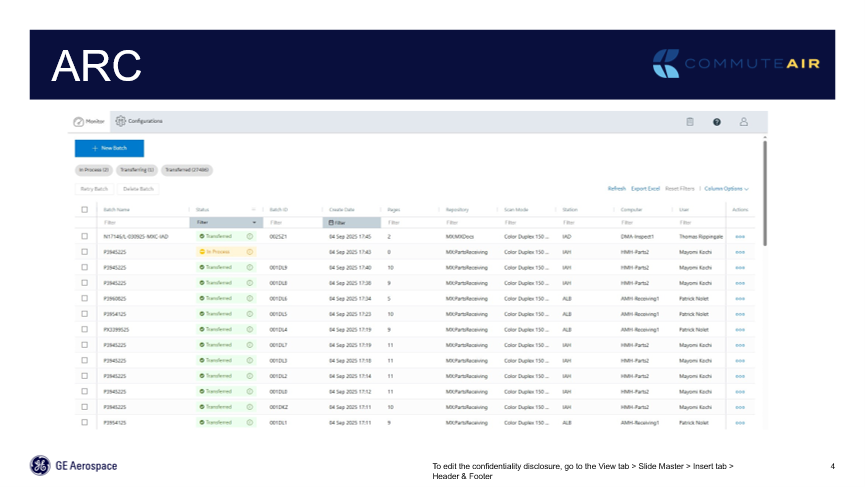
Figure 3
The system is very efficient so that users are using it four or five times a day, but not more than three hours a week. And we’ll look at some of that as we move through the figures including figure 4.
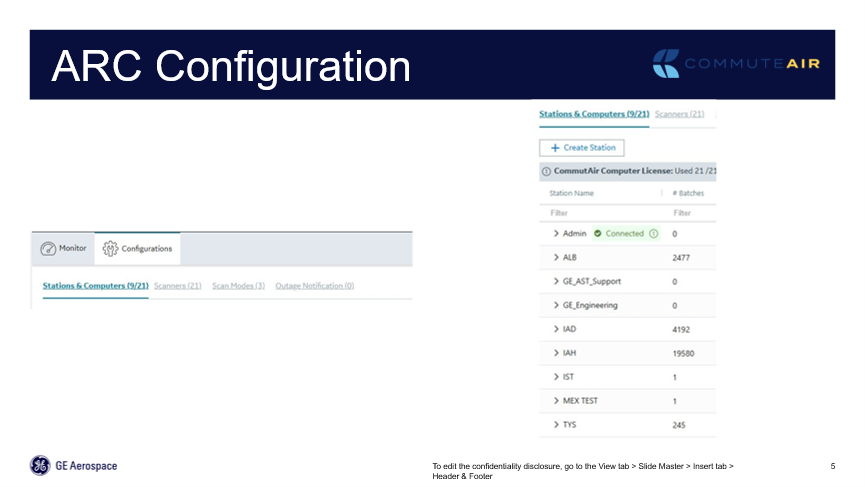
Figure 4
Configuration includes how to set up the system; GE Aerospace were very supportive here and we have limited configuration control on the dashboard. We can go in and, if we need to change a scanner at a particular station and replace it, that can be arranged remotely through the dashboard, from a worksite or at home.
As in figure 5.1, scanning is now a simple task, with no searching for buttons.
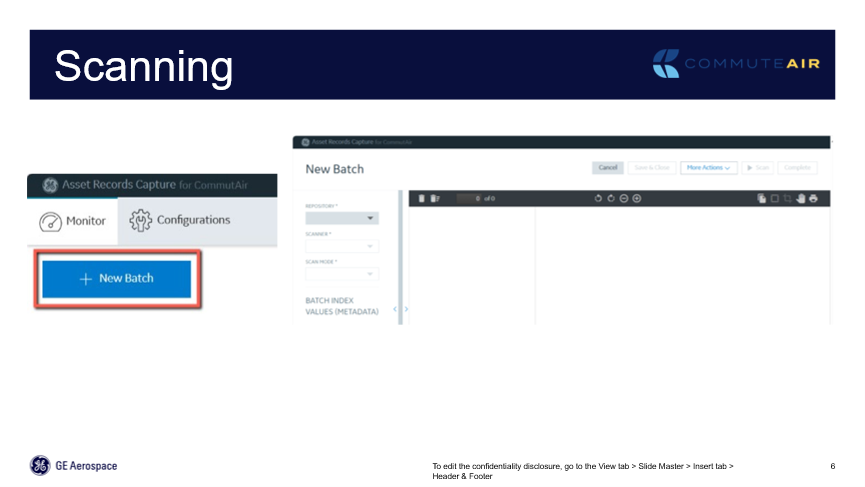
Figure 5.1
It’s all clear: for instance, to create a new scan batch, just click on the button which moves into the next screen, figure 5.2.
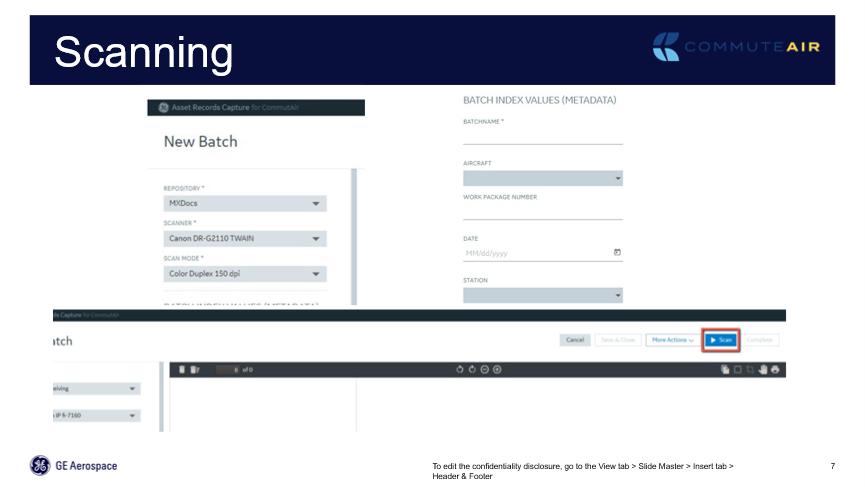
Figure 5.2
Here, there is the naming convention and selection of what repository we are scanning into. At CommuteAir, we scan MXDocs, which are our maintenance performance documents. We also scan parts receiving; every component that comes into stores gets scanned into a batch and a separate repository. We can pick which repository, the scanner being used, the color, etc. Then we go into batch index values, or naming convention, name the batch, and on to scan those documents.
There is now a thumbnail image of every page that has just been scanned as in figure 5.3.
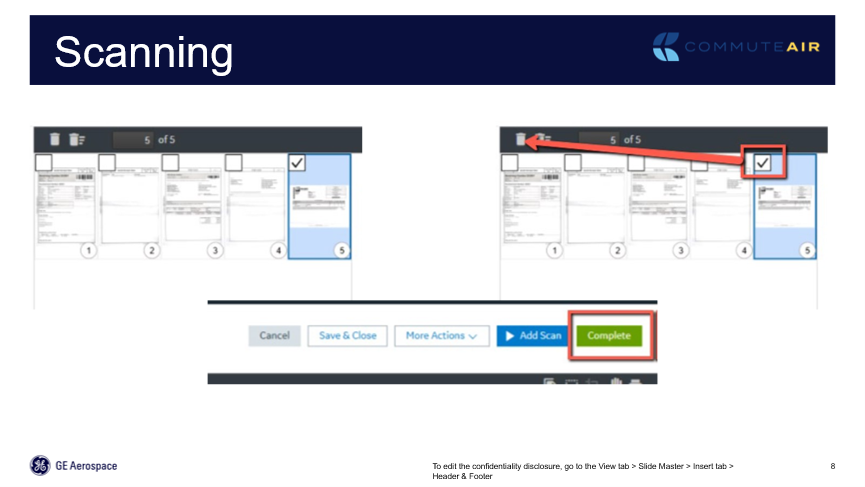
Figure 5.3
Here, the user can reorganize the order, reorientate the page and delete blank pages. The system does a great job of recognizing and deleting blank pages, but if a stamp bleeds through from the log page, then, the system leaves it for the user to decide. Another great feature is Add Scan. The old third-party application had that ability, but it was clunky. Sometimes it worked but it was variable which led to people pushing the button multiple times which froze the system, Once the thumbnails are accepted, just press the green Complete button and it moves to the next phase, monitoring and reporting as in figure 6.1.
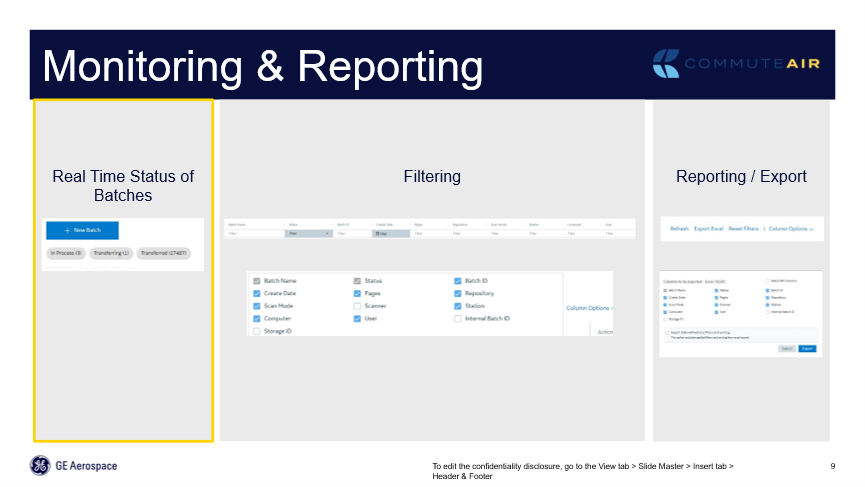
Figure 6.1
One of the biggest efficiencies that ARC has created for us is the ability of every user to monitor their batch and ensure that their batch is completed and transferred to the next step in the process. Pre-ARC, somebody on the supervisory managerial level had to monitor that and records text where re-scanning was needed because something didn’t process through to a fully transferred status. Each user that logs in when they scan, sees the dashboard for their scans. Our user teams have been our scanners. Users have been trained to monitor if the batch does not go into a transferred status, and what are the troubleshooting steps if there’s a problem, with a chain of command of who to go to next.
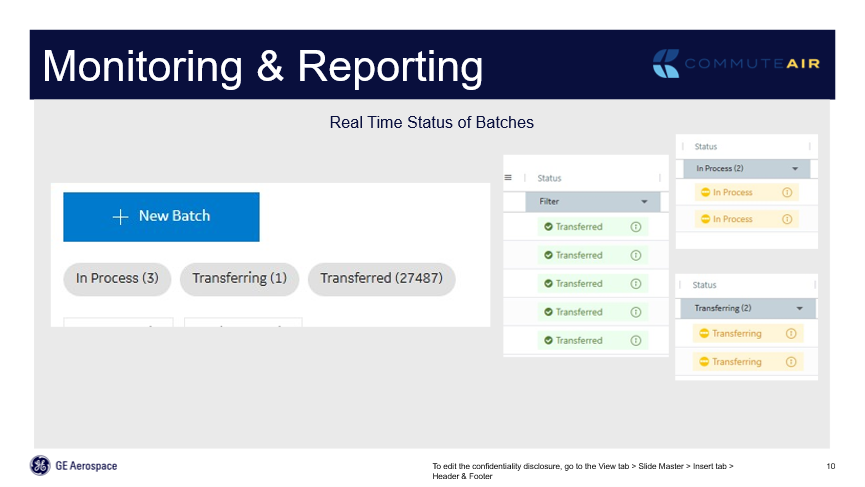
Figure 6.2
On the right of figure 6.2 are the different statuses; ‘Transferred’ means it moved right through to the next step. ‘In Process’ shows a user is currently scanning a batch, that’s how detailed the system is. I can see this user is in the middle of scanning a batch right now. ‘Transferring’ means that it’s in the process: the system is reading those documents, moving them to the correct repository, and looking at that information. On the left side of the figure, you can see just a grab from the dashboard; In Process, Transferring and Transferred. Users don’t even have to scroll through the whole list for the organization but can immediately see that there are three batches in process and one batch in transfer. Clicking on any one of those buttons, take the user to every batch that’s in that current status. From there, a user can drill in to see the scanning location and the user, to start determining whether it’s a station issue, a user issue or a GE Aerospace issue. 95 percent of scanning halts and stalls have been user issues.
We’ve run into a couple of lags in the system that GE Aerospace is working on, and those are typically because there is not a lot of user scanning in the system over the weekend. That leads to heavy usage on Monday morning, which means that users keep going back and looking at their status because it’s queued and waiting, because we just scanned 800 batches in an hour.
That dashboard monitors the entire organization but, with Filtering, we can drill in to look at a particular station or a particular user’s batches as in figure 6.3.
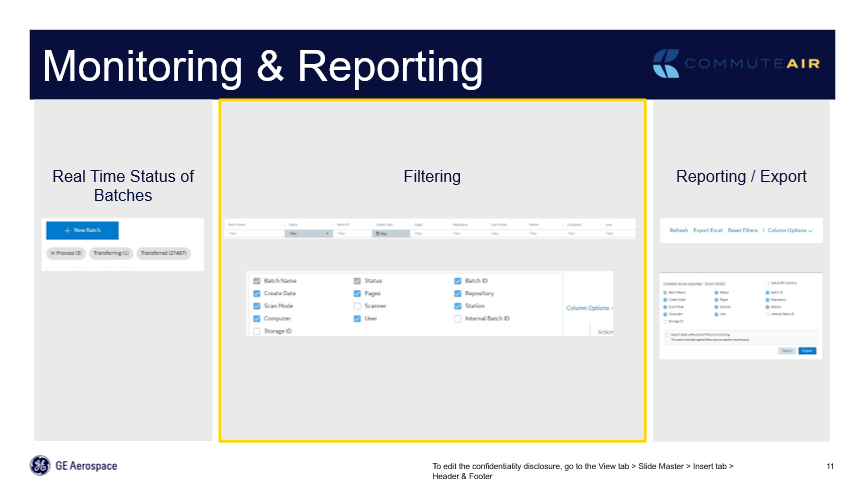
Figure 6.3
That’s allowed us to monitor if, say, we’re not seeing documentation from a specific station; typically, we can drill in to see if we can see anything before reaching out to the user to ask what’s going on. Sometimes, there’s only one person scanning at a location and, if he goes on vacation and nothing’s been scanned in four or five days, we know he’s on vacation. The system is pretty easy to work with.
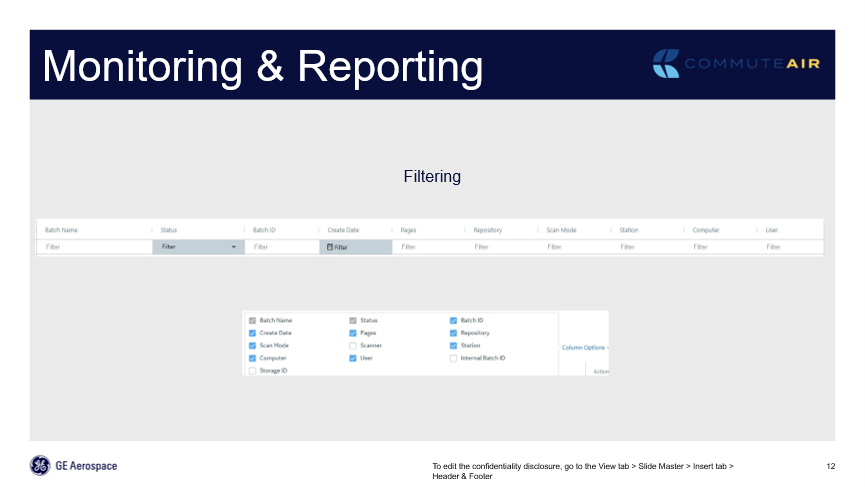
Figure 6.4
Figure 6.4 is a screengrab showing the ability to filter to any of those columns, and then, as seen in figure 6.5, Reporting and Exporting.
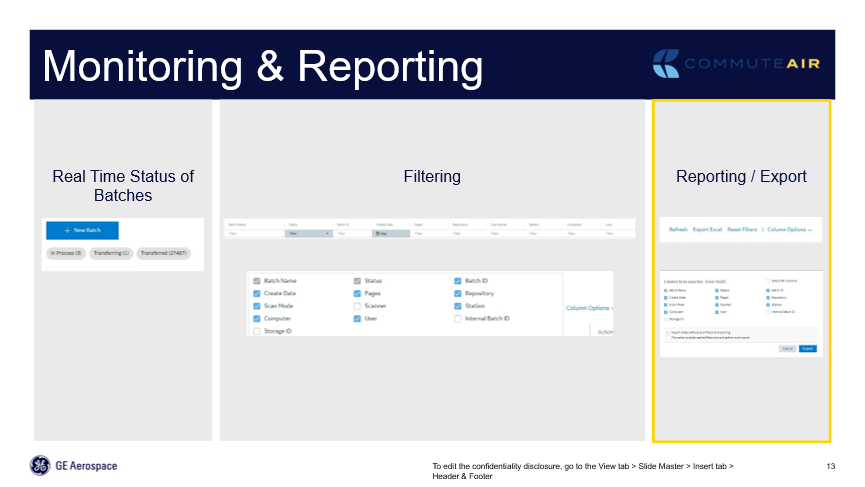
Figure 6.5
Again, users can filter to only see certain columns, certain users, certain repositories. And at the right side of the dashboard is an Export button which takes probably two or three seconds to export the entire file – see figure 6.6.
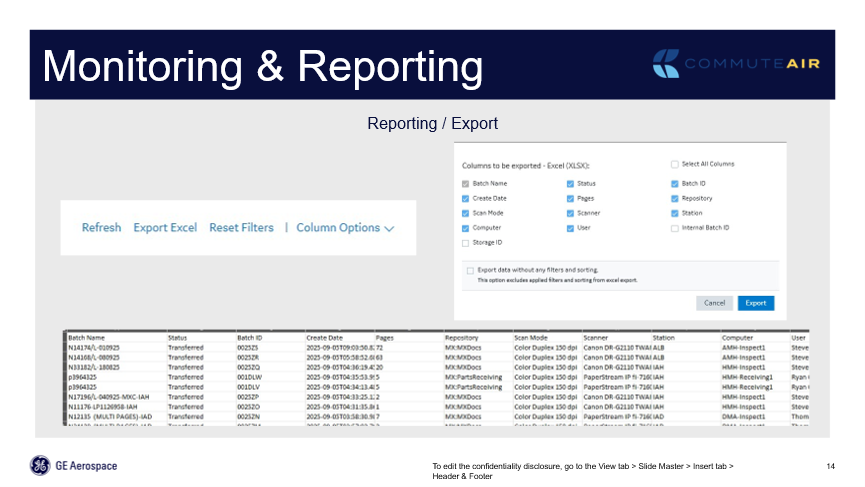
Figure 6.6
As I mentioned above, in July 2025, we were 100% transferred over to the ARC process, having started testing in November, only using two stations to start the system and test how it was going, but that was a contract team, brought in to scan all historical records, a pretty good stress test on the system. Since that testing in November 2024, up to the time of writing, we had scanned over 28,000 batches into ARC, and the system has successfully ingested and moved them into the electronic repository that is searchable.
We couldn’t have done these things before. It has been a great collaboration with GE Aerospace, SaaS through all of this. We have pushed them hard, so it speaks greatly to that relationship. But implementation and moving is a challenge. So, I want to show a couple of the best practices in getting us from one system to the other system.
BEST PRACTICES AND EFFICIENCIES
At CommuteAir, QC inspectors do all the scanning and maintenance work packages at the maintenance locations. They know what you need, but they’re sending the hard copy. Why do they have to scan every page? We’re auditing maintenance paperwork almost live now, because they’re scanning it as they work with the work package. My team in records is auditing, and we know the status, and we’re alerting problems with paperwork, discrepancies, non-applicable parts installed in in the wrong position, or something like that, before that aircraft leaves. We don’t have to bring the aircraft back into a station because we waited two days for FedEx to deliver parts; we’re doing all of that live which has been a challenge. But we developed the standardized process and, as mentioned above, the naming, convention. We name every batch by the work package number. It’s simple, and for everybody to see, the Maintenance Group and the QC. It’s there on the paperwork; the work package number, the tail number, and the station. That’s the naming convention for maintenance paperwork.
Parts receiving, Repository, they use their purchase order, repair order or whatever the order number is, and that’s the name for the batch. However, CommuteAir only wants one mandatory field. The other fields are nice, but they don’t give any data in the index in the dashboard. GE has operators that want it but at CommuteAir, we don’t need it to be mandatory, we want less keystrokes, just batch and name, page order. It might seem tedious but. if everybody scans the documents in the same order, that streamlines the system. My team audit it the same way. Having the team put the paperwork in the same order not only streamlined and made us more efficient in the scanning and the indexing in AirVault, but it actually made our physical auditing from the QC standpoint, a little more efficient, because we explained it as, ‘this is the way Records audits it’ which makes more sense. If we take a minute and put it in a certain order to get it ready for scanning, it makes the physical audit easier. So, we got two efficiencies out of that.
With blank page deletion, the GE Aerospace, SaaS system recognizes blank pages but as mentioned above, there can be bleed through pages. Our scan users, when reviewing thumbnails (figure 5.3), make that assessment, ensure that it’s a bleed through and not a bad scan of an applicable page which would mean deleting that, scanning the page in again and adding the scan. If not a bad scan, delete it, don’t keep passing that blank page down to the next person, for somebody else to make the decision. Let’s make it at the beginning, and then the self-monitoring and auditing, telling the team if your batch didn’t go through, you physically still have the paperwork. When we couldn’t self-audit the third-party application, it was scanned, the user assumed it had gone through because they’d hit Complete. The paperwork went into a shipping box that would take two to three days till Records could get it. We lost that two to three days of being able to pre-audit it before the plane left from a record standpoint. In the standard processes, we included troubleshooting tips to try before sending it to us to resolve.
With the third-party solution we suffered scanner jams in most batches. We started looking at the paper, the ink, the scanner itself – we replaced, I think, four scanners – machines. We were trying everything. But, when we started implementing ARC, we found that what we had considered a junk scanner was now one of our best machines. Jams are down by at least fifty percent. We also get seamless page additions; if a page does misfeed in the scanner, you need to re-scan that page. It’s a simple add Scan button, and it’s seamless. It just ingests the new page exactly where the user wants it to be, with the correct orientation.
A feature incorporated in the system that also makes us more efficient is batch recovery. If, for some reason, a batch completes but doesn’t transfer, we can go in and do batch recovery. It will pull the scanned batch back out of the local history on the computer, and the user can hit Complete again and continue without having to re-scan the entire batch. No-one wants to watch an A check go through the scanner numerous times, let alone a C check.
Another of the best things we’ve done is our parts receiving repository. As mentioned above, every part that comes into the building gets scanned, whether it’s a rotable, consumable or repairable, it gets scanned. They were manually scanning documents, before even the third-party system; manually scanning and uploading them by hand into the operating system. With GE and ARC, stores personnel, receivers, now scan that document, press Complete, and never touch it or that batch again. It goes straight into the operating system. I have it linking in four different locations in my AMOS system and, again, I press Complete Batch, and it goes directly into those four AMOS locations. In the AMOS QC, APN (Application Program Number) in the Rotables Administration, in Stores and in Order Management. It’s in all of those locations, and it doesn’t rewrite over itself. As an example, wheels, because they’re frequently changed. If I go into rotables administration on a wheel, there’s the history of every time I received that particular serial number, right there at a click of a button within the APN.
And then there’s a single sign on. That was something that we pushed really hard with ARC implementation. Our IT team wanted single sign-on: I use a lot of different systems throughout the day and I’m tired of typing in those new 15- and 20-digit passwords that I have to change every 90 days. Let me do it once in the morning and keep on single signing the rest of the day. The added feature for that with single sign on as well as all of the linking that the system does right into our AMOS operating system means that now, even users don’t use AirVault. Mechanics, Engineering Department, QC department, I’ve even trained my Chief Inspector. They go into a particular event or component in AMOS, they click on that link, and it takes them directly to the document within AirVault, they don’t even have to type their username or password in. They don’t have to have a separate username and password for AirVault.
It’s been a great experience and project bringing CommuteAir scanning up to date but well worth it in the end.
Comments (0)
There are currently no comments about this article.
To post a comment, please login or subscribe.